Frontend Development — React & Next.js
Learn how modern web frontends are built using React and Next.js, covering component-based UI, state management, routing, data fetching, and the fundamentals of building production-ready web applications.

#React#
React Interview Preparation Guide
A complete, structured guide to React — from fundamentals to advanced topics — written to make you interview-ready. Covers modern React (18/19), hooks, performance, patterns, testing, and the most common interview questions.
Table of Contents
- What is React?
- JSX
- Components
- Props
- State
- Event Handling
- Conditional Rendering
- Lists and Keys
- Forms: Controlled vs Uncontrolled
- Component Lifecycle
- Hooks (Deep Dive)
- Custom Hooks
- Virtual DOM, Reconciliation and Fiber
- Rendering Behavior and Re-renders
- Performance Optimization
- State Management
- Context API
- Routing (React Router)
- Data Fetching
- Advanced Patterns
- Error Boundaries
- Portals, Refs and Fragments
- Code Splitting, Lazy and Suspense
- Concurrent Features (React 18)
- React 19 New Features
- Server Components and SSR
- Styling in React
- TypeScript with React
- Testing
- Security
- Accessibility
- Best Practices and Project Structure
- Common Interview Questions (Quick Answers)
- Coding Challenges to Practice
- Final Checklist
1. What is React?
- React is a JavaScript library (not a full framework) for building user interfaces, created by Facebook (Meta) in 2013.
- It is declarative: you describe what the UI should look like for a given state, and React figures out how to update the DOM.
- It is component-based: UIs are built from small, reusable, isolated pieces.
- It uses a Virtual DOM to update the real DOM efficiently.
- It follows unidirectional data flow (data flows parent → child via props).
Key Features
| Feature | Meaning |
|---|---|
| Declarative UI | Describe UI as a function of state |
| Component-based | Reusable, composable building blocks |
| Virtual DOM | In-memory representation used to compute minimal DOM updates |
| One-way data binding | Predictable data flow |
| Hooks | Use state and lifecycle in function components |
| Ecosystem | Router, state libs, Next.js, React Native |
Library vs Framework
- React handles only the view layer. Routing, data fetching, and state management are chosen separately (React Router, TanStack Query, Redux, etc.).
- Angular is a full framework with built-in routing, DI, HTTP client, and forms.
Create a React App (Modern)
npm create vite@latest my-app -- --template react
# or
npx create-next-app@latest
Create React App (CRA) is deprecated. Use Vite, Next.js, or Remix/React Router framework mode.
2. JSX
JSX (JavaScript XML) is a syntax extension that looks like HTML but is compiled into JavaScript function calls.
const element = <h1 className="title">Hello, {name}</h1>;
// Compiles to:
const element = React.createElement('h1', { className: 'title' }, 'Hello, ', name);
// (modern: jsx() from react/jsx-runtime)
JSX Rules
- Single root element — wrap in a parent or Fragment (
<>...</>). - Close all tags —
<img />,<input />. - camelCase attributes —
className,htmlFor,onClick,tabIndex. - JavaScript expressions in
{}— variables, function calls, ternaries (not statements likeiforfor). - Style as an object —
style={{ color: 'red', fontSize: 16 }}. - Comments —
{/* comment */}.
Why className and not class?
class is a reserved keyword in JavaScript.
JSX Prevents Injection
React DOM escapes values embedded in JSX before rendering, which protects against XSS by default.
3. Components
Function Components (Standard)
function Welcome({ name }) {
  return <h1>Hello, {name}</h1>;
}
Class Components (Legacy)
class Welcome extends React.Component {
  render() {
    return <h1>Hello, {this.props.name}</h1>;
  }
}
Rules
- Component names must start with a capital letter.
- Components must be pure with respect to props/state: same inputs → same output.
- Never mutate props.
- Don't define components inside other components (causes remounting on every render).
Function vs Class Components
| Aspect | Function | Class |
|---|---|---|
| Syntax | Plain function | ES6 class extending React.Component |
| State | useState | this.state, setState |
| Lifecycle | useEffect | componentDidMount, etc. |
this | Not needed | Required, binding issues |
| Boilerplate | Less | More |
| Status | Recommended | Legacy (still supported) |
Pure Components
A component is pure if it renders the same output for the same props and state. React.memo / PureComponent skip re-render when props are shallow-equal.
4. Props
Props are read-only inputs passed from parent to child.
function Card({ title, children, onClick = () => {} }) {
  return (
    <div onClick={onClick}>
      <h2>{title}</h2>
      {children}
    </div>
  );
}

<Card title="Hello" onClick={handle}>
  <p>Body</p>
</Card>
Key Points
- Props are immutable inside the child.
childrenis a special prop for nested content.- Use destructuring and default values.
- Spread props:
<Comp {...props} />(use carefully). - Prop drilling: passing props through many layers → solve with Context, composition, or state libraries.
- Validate with TypeScript (preferred) or
prop-types.
Props vs State
| Props | State |
|---|---|
| Passed from parent | Owned by the component |
| Read-only | Mutable via setter |
| Change → parent re-renders child | Change → component re-renders |
5. State
State is data that changes over time and triggers re-renders.
const [count, setCount] = useState(0);
Rules of State
- Never mutate state directly. Create new objects/arrays.
- State updates are asynchronous / batched — the new value is available on the next render.
- Use the functional updater when new state depends on previous state.
// Wrong
count = count + 1;
state.items.push(x);

// Right
setCount(c => c + 1);
setItems(items => [...items, x]);
setUser(u => ({ ...u, name: 'Ann' }));
Why does this log the old value?
setCount(count + 1);
console.log(count); // still old value — state is a snapshot per render
Batching
React batches multiple state updates into one re-render. Since React 18, batching works everywhere (events, promises, timeouts) — automatic batching.
setA(1);
setB(2); // one render
Lazy Initial State
const [data, setData] = useState(() => expensiveComputation()); // runs once
Lifting State Up
When two components need the same data, move state to their closest common ancestor and pass down via props.
Immutable Update Cheat Sheet
// Object
setObj(o => ({ ...o, key: value }));
// Nested
setObj(o => ({ ...o, address: { ...o.address, city: 'X' } }));
// Array add / remove / update
setArr(a => [...a, item]);
setArr(a => a.filter(x => x.id !== id));
setArr(a => a.map(x => x.id === id ? { ...x, done: true } : x));
For deeply nested state, use Immer (
useImmer) or restructure state.
6. Event Handling
<button onClick={handleClick}>Click</button>
<input onChange={e => setValue(e.target.value)} />
<form onSubmit={e => { e.preventDefault(); submit(); }} />
- Events are camelCase; you pass a function, not a string.
- React wraps native events in SyntheticEvent (cross-browser wrapper). Since React 17, events are attached to the root container, not
document. Event pooling was removed in 17. - Use
e.preventDefault()ande.stopPropagation(). - Common mistake:
onClick={handle()}— this calls the function during render. UseonClick={handle}oronClick={() => handle(id)}.
Event Delegation
React uses event delegation internally: a single listener at the root handles all events.
7. Conditional Rendering
{isLoggedIn ? <Dashboard /> : <Login />}
{isAdmin && <AdminPanel />}
{items.length > 0 && <List items={items} />}   // careful: {0 && ...} renders "0"
if (loading) return <Spinner />;               // early return
Pitfall:
{count && <X />}renders0when count is 0. Usecount > 0 &&or!!count &&.
Returning null renders nothing.
8. Lists and Keys
{todos.map(todo => <TodoItem key={todo.id} {...todo} />)}
Why Keys?
Keys help React identify which items changed, were added, or removed during reconciliation, preserving state and DOM nodes correctly.
Rules
- Keys must be unique among siblings and stable.
- Use a unique ID from data.
- Avoid
indexas key when the list can be reordered, filtered, or inserted into — it causes bugs with state and inputs, and wasteful re-renders. - Never use
Math.random()as key (remounts every render). - Keys are not accessible as props.
- Changing a component's
keyresets its state (useful trick).
9. Forms: Controlled vs Uncontrolled
Controlled Components
Form value is stored in React state.
const [name, setName] = useState('');
<input value={name} onChange={e => setName(e.target.value)} />
Uncontrolled Components
Form data is handled by the DOM; read via ref or FormData.
const ref = useRef();
<input defaultValue="x" ref={ref} />
// ref.current.value
| Controlled | Uncontrolled |
|---|---|
| Single source of truth in React | DOM is the source of truth |
| Easy validation, instant feedback | Less code, fewer re-renders |
| More re-renders | Harder to validate live |
Form Libraries
React Hook Form (performant, uncontrolled-based), Formik, Zod/Yup for schema validation.
10. Component Lifecycle
Three phases: Mounting → Updating → Unmounting (plus error handling).
Class Lifecycle Methods
| Phase | Methods |
|---|---|
| Mounting | constructor → render → componentDidMount |
| Updating | shouldComponentUpdate → render → getSnapshotBeforeUpdate → componentDidUpdate |
| Unmounting | componentWillUnmount |
| Errors | getDerivedStateFromError, componentDidCatch |
Function Component Equivalents (with useEffect)
useEffect(() => { /* componentDidMount */ }, []);
useEffect(() => { /* didMount + didUpdate when dep changes */ }, [dep]);
useEffect(() => { return () => { /* componentWillUnmount (cleanup) */ }; }, []);
11. Hooks (Deep Dive)
Hooks let function components use state and other React features (introduced in React 16.8).
Rules of Hooks
- Call hooks only at the top level (not inside loops, conditions, or nested functions).
- Call hooks only from React function components or custom hooks.
Why? React relies on the call order of hooks to associate state with each hook between renders.
Use the ESLint plugin: eslint-plugin-react-hooks.
useState
const [state, setState] = useState(initial);
See State.
useEffect
Runs side effects after render (data fetching, subscriptions, timers, manual DOM changes).
useEffect(() => {
  const id = setInterval(tick, 1000);
  return () => clearInterval(id);   // cleanup
}, [dep1, dep2]);
| Dependency array | Behavior |
|---|---|
| none | Runs after every render |
[] | Runs once after mount |
[a, b] | Runs when a or b change |
Key points:
- Cleanup runs before the next effect and on unmount.
- In Strict Mode (dev), React mounts → unmounts → mounts again to surface missing cleanups.
- Effects capture values from the render they were created in (closures) → stale closure bugs.
- You might not need an effect: derive values during render; handle user actions in event handlers; don't sync state with state in effects.
- Fetching in effects: handle race conditions with an
ignoreflag orAbortController.
useEffect(() => {
  const controller = new AbortController();
  fetch(url, { signal: controller.signal })
    .then(r => r.json()).then(setData)
    .catch(e => { if (e.name !== 'AbortError') setError(e); });
  return () => controller.abort();
}, [url]);
useLayoutEffect
Same as useEffect but runs synchronously after DOM mutations, before paint. Use for measuring layout (e.g., element size) to avoid flicker. Blocks painting; use sparingly.
useInsertionEffect
For CSS-in-JS libraries to inject styles before layout reads.
useRef
const inputRef = useRef(null);
inputRef.current.focus();
- Holds a mutable value that persists across renders without causing re-render.
- Uses: DOM access, storing timers/previous values, instance-like variables.
- Don't read/write
ref.currentduring render (except for initialization).
useMemo
Memoizes a computed value.
const sorted = useMemo(() => items.sort(cmp), [items]);
useCallback
Memoizes a function reference.
const handle = useCallback(() => doSomething(id), [id]);
useCallback(fn, deps) ≡ useMemo(() => fn, deps).
When to use: passing callbacks to memoized children (React.memo), dependencies of other hooks, expensive calculations. Don't overuse — they have their own cost. (With the React Compiler, much of this is automated.)
useContext
const theme = useContext(ThemeContext);
See Context API.
useReducer
For complex state logic or when next state depends on previous in multiple ways.
function reducer(state, action) {
  switch (action.type) {
    case 'inc': return { count: state.count + 1 };
    case 'dec': return { count: state.count - 1 };
    default: throw new Error('Unknown action');
  }
}
const [state, dispatch] = useReducer(reducer, { count: 0 });
dispatch({ type: 'inc' });
useState vs useReducer: use useReducer for multiple related values, complex transitions, or when you want testable, centralized update logic.
useId
Generates stable unique IDs (SSR-safe) for accessibility attributes (htmlFor, aria-*). Not for list keys.
useImperativeHandle
Customizes the instance value exposed to parent via ref.
useImperativeHandle(ref, () => ({ focus: () => inputRef.current.focus() }), []);
useDebugValue
Labels custom hooks in React DevTools.
useSyncExternalStore
Subscribes to external stores safely with concurrent rendering (used by Redux, Zustand internally).
useTransition / useDeferredValue
See Concurrent Features.
React 19 hooks: use, useActionState, useOptimistic, useFormStatus
See React 19.
12. Custom Hooks
A custom hook is a function starting with use that calls other hooks to reuse stateful logic.
function useLocalStorage(key, initial) {
  const [value, setValue] = useState(() => {
    try {
      const saved = localStorage.getItem(key);
      return saved ? JSON.parse(saved) : initial;
    } catch { return initial; }
  });
  useEffect(() => {
    localStorage.setItem(key, JSON.stringify(value));
  }, [key, value]);
  return [value, setValue];
}
function useDebounce(value, delay = 300) {
  const [debounced, setDebounced] = useState(value);
  useEffect(() => {
    const t = setTimeout(() => setDebounced(value), delay);
    return () => clearTimeout(t);
  }, [value, delay]);
  return debounced;
}
function useFetch(url) {
  const [state, setState] = useState({ data: null, error: null, loading: true });
  useEffect(() => {
    const controller = new AbortController();
    setState(s => ({ ...s, loading: true }));
    fetch(url, { signal: controller.signal })
      .then(r => { if (!r.ok) throw new Error(r.status); return r.json(); })
      .then(data => setState({ data, error: null, loading: false }))
      .catch(error => { if (error.name !== 'AbortError') setState({ data: null, error, loading: false }); });
    return () => controller.abort();
  }, [url]);
  return state;
}
Other common ones: usePrevious, useToggle, useOnClickOutside, useWindowSize, useInterval, useMediaQuery.
Key point: custom hooks share logic, not state — each call gets its own isolated state.
13. Virtual DOM, Reconciliation and Fiber
Virtual DOM
A lightweight JavaScript object tree representing the UI. On state change:
- React creates a new virtual tree.
- Diffs it against the previous tree (reconciliation).
- Computes the minimal set of changes.
- Commits those changes to the real DOM.
Diffing Heuristics (O(n))
- Elements of different types → destroy old tree, build new one (state lost).
- Elements of the same type → update attributes, keep instance/state, recurse into children.
- Keys identify moved/stable children in lists.
Render Phase vs Commit Phase
| Render phase | Commit phase |
|---|---|
| Pure, can be paused/restarted/discarded (concurrent) | Synchronous, applies DOM changes |
| Calls component functions | Runs useLayoutEffect, then useEffect (after paint) |
React Fiber
The reconciliation engine introduced in React 16. It breaks rendering into units of work (fibers), enabling incremental rendering, prioritization, pausing/resuming, which powers concurrent features.
Shadow DOM vs Virtual DOM
Shadow DOM is a browser feature for encapsulating DOM/CSS in web components. Virtual DOM is a React concept for efficient updates. They are unrelated.
14. Rendering Behavior and Re-renders
A component re-renders when:
- Its state changes.
- Its parent re-renders (even if props are the same, unless memoized).
- A context it consumes changes.
- (Class)
forceUpdateis called.
Props changing does not itself trigger render — the parent re-rendering does.
Common Causes of Unnecessary Re-renders
- New object/array/function created inline each render passed as props.
- Context value changes (object recreated each render).
- Putting state too high in the tree.
Strict Mode
<StrictMode> (dev only) double-invokes component functions, effects (mount/unmount/mount) to detect impure code and missing cleanup. It does not affect production.
15. Performance Optimization
Tools
React.memo(Component)— skip re-render if props are shallow-equal.useMemo— cache expensive calculations.useCallback— stable function identity for memoized children.- Code splitting —
React.lazy+Suspense. - Virtualization (windowing) —
react-window,react-virtuosofor long lists. - Debounce / throttle inputs.
useTransition/useDeferredValue— keep UI responsive.- Move state down (colocate) / lift content up (pass
children). - Stable keys.
- Avoid anonymous objects as props to memoized components.
- Production build, tree shaking, image optimization, lazy-load images.
- React Compiler (React 19 ecosystem) — auto-memoizes, reducing manual
useMemo/useCallback.
const Child = React.memo(function Child({ data, onSelect }) { ... });
Measuring
- React DevTools Profiler — find slow/frequent renders.
<Profiler>component, Lighthouse, Web Vitals (LCP, INP, CLS).
Rule: measure first, optimize second. Premature memoization adds complexity.
Composition Trick (avoid re-renders)
// children are created by the parent, so they don't re-render when ScrollTracker's state changes
function ScrollTracker({ children }) {
  const [y, setY] = useState(0);
  return <div onScroll={e => setY(e.currentTarget.scrollTop)}>{children}</div>;
}
16. State Management
Types of State
| Type | Examples | Tools |
|---|---|---|
| Local UI state | Input value, modal open | useState, useReducer |
| Shared client state | Theme, cart, auth | Context, Zustand, Redux Toolkit, Jotai |
| Server state | API data, caching | TanStack Query (React Query), SWR, RTK Query |
| URL state | Filters, pagination | React Router / search params |
| Form state | Fields, errors | React Hook Form, Formik |
Redux (Redux Toolkit)
Core ideas: single store, actions, reducers (pure), immutable updates, unidirectional flow.
UI → dispatch(action) → reducer → new state → store → UI re-renders
import { createSlice, configureStore } from '@reduxjs/toolkit';

const counterSlice = createSlice({
  name: 'counter',
  initialState: { value: 0 },
  reducers: {
    increment: state => { state.value += 1; },   // Immer allows "mutation" syntax
    add: (state, action) => { state.value += action.payload; },
  },
});
export const { increment, add } = counterSlice.actions;
export const store = configureStore({ reducer: { counter: counterSlice.reducer } });

// Component
const value = useSelector(s => s.counter.value);
const dispatch = useDispatch();
dispatch(increment());
- Middleware:
redux-thunk(async),redux-saga, RTK listener middleware. - RTK Query: data fetching and caching built into Redux Toolkit.
Zustand (lightweight)
const useStore = create(set => ({
  count: 0,
  inc: () => set(s => ({ count: s.count + 1 })),
}));
const count = useStore(s => s.count);
Context vs Redux
- Context is a dependency injection mechanism, not a full state manager; every consumer re-renders when the value changes.
- Redux/Zustand give selectors, devtools, middleware, and fine-grained subscriptions.
17. Context API
Avoids prop drilling by sharing values with the whole subtree.
const ThemeContext = createContext('light');

function App() {
  const [theme, setTheme] = useState('light');
  const value = useMemo(() => ({ theme, setTheme }), [theme]);
  return (
    <ThemeContext.Provider value={value}>
      <Page />
    </ThemeContext.Provider>
  );
}

function Button() {
  const { theme } = useContext(ThemeContext);
  return <button className={theme}>Hi</button>;
}
Tips
- Memoize the provider value to avoid needless consumer re-renders.
- Split contexts (state vs dispatch, or by domain) to limit re-renders.
- Wrap in a custom hook:
useTheme()with an error if used outside the provider. - React 19: you can render
<ThemeContext value={...}>directly (no.Provider). - Not ideal for high-frequency updates.
18. Routing (React Router)
import { createBrowserRouter, RouterProvider, Link, Outlet, useParams, useNavigate } from 'react-router-dom';

const router = createBrowserRouter([
  {
    path: '/',
    element: <Layout />,          // contains <Outlet />
    errorElement: <ErrorPage />,
    children: [
      { index: true, element: <Home /> },
      { path: 'users/:id', element: <User />, loader: userLoader },
      { path: '*', element: <NotFound /> },
    ],
  },
]);

<RouterProvider router={router} />
Core Concepts
<Link>/<NavLink>— client-side navigation (no full reload).useParams,useSearchParams,useLocation,useNavigate.- Nested routes +
<Outlet />. - Protected routes — wrapper component that redirects if unauthenticated (
<Navigate to="/login" replace />). - Loaders / Actions (data APIs) for fetching and mutations tied to routes.
- Lazy routes for code splitting.
BrowserRouter(HTML5 history) vsHashRouter(URL hash).
19. Data Fetching
Basic Approach
useEffect + fetch/axios + loading/error state (good for learning; production apps should use a library).
TanStack Query (React Query)
const { data, isLoading, error } = useQuery({
  queryKey: ['todos', userId],
  queryFn: () => fetchTodos(userId),
  staleTime: 60_000,
});

const mutation = useMutation({
  mutationFn: addTodo,
  onSuccess: () => queryClient.invalidateQueries({ queryKey: ['todos'] }),
});
Provides: caching, background refetch, deduping, retries, pagination, optimistic updates.
Other Approaches
- Suspense-enabled data fetching (
use, framework loaders, Server Components). - GraphQL: Apollo Client, urql, Relay.
Common Pitfalls
- Race conditions (out-of-order responses).
- Missing cleanup / aborting requests.
- Fetch waterfalls (sequential dependent requests).
- Not handling error and loading states.
20. Advanced Patterns
Higher-Order Component (HOC)
A function that takes a component and returns a new enhanced component.
function withAuth(Component) {
  return function Wrapped(props) {
    const user = useUser();
    return user ? <Component {...props} user={user} /> : <Login />;
  };
}
Drawbacks: wrapper hell, prop collisions, harder to type. Mostly replaced by hooks.
Render Props
A prop whose value is a function returning JSX.
<Mouse render={({ x, y }) => <p>{x},{y}</p>} />
Compound Components
Components that work together sharing implicit state (e.g., <Tabs><Tabs.List/><Tabs.Panel/></Tabs>), usually via Context.
Container / Presentational
Separate data logic from UI (largely superseded by custom hooks).
Controlled Props / State Reducer / Provider Pattern
Give consumers control over internal state or reducer logic.
Composition over Inheritance
React recommends composing components with props and children rather than class inheritance.
Forward Refs
const Input = forwardRef((props, ref) => <input ref={ref} {...props} />);
In React 19, ref can be passed as a normal prop in function components (forwardRef no longer required).
Hooks vs HOC vs Render Props
| Pattern | Reuses | Modern preference |
|---|---|---|
| Custom hooks | Logic | Preferred |
| HOC | Logic + wrapping | Legacy / cross-cutting |
| Render props | Logic + render control | Occasionally |
21. Error Boundaries
Catch JavaScript errors in the render phase, lifecycle methods, and constructors of the child tree and show a fallback UI.
class ErrorBoundary extends React.Component {
  state = { hasError: false };
  static getDerivedStateFromError() { return { hasError: true }; }
  componentDidCatch(error, info) { logToService(error, info); }
  render() {
    return this.state.hasError ? <h1>Something went wrong.</h1> : this.props.children;
  }
}
Not caught by error boundaries
- Event handlers (use try/catch)
- Async code (setTimeout, promises)
- Server-side rendering errors
- Errors in the boundary itself
Error boundaries must be class components; for function components use the
react-error-boundarylibrary.
22. Portals, Refs and Fragments
Portals
Render children into a different DOM node outside the parent hierarchy (modals, tooltips, dropdowns). Events still bubble through the React tree.
createPortal(<Modal />, document.body);
Refs
- Access DOM nodes or hold mutable values.
- Callback refs:
ref={node => ...}. - Avoid overusing refs for things that can be done declaratively.
Fragments
Group elements without adding extra DOM nodes.
<>...</>                       // short syntax
<React.Fragment key={id}>...</React.Fragment>   // when a key is needed
23. Code Splitting, Lazy and Suspense
const Dashboard = React.lazy(() => import('./Dashboard'));

<Suspense fallback={<Spinner />}>
  <Dashboard />
</Suspense>
React.lazyworks with default exports (dynamicimport()).Suspenseshows a fallback while children are loading (lazy components, data viause, or Suspense-enabled libs).- Split by route first, then by heavy components.
- Combine with error boundaries to handle load failures.
24. Concurrent Features (React 18)
Concurrent rendering lets React interrupt, pause, and prioritize renders to keep the UI responsive. Enabled by using createRoot.
import { createRoot } from 'react-dom/client';
createRoot(document.getElementById('root')).render(<App />);
Features
- Automatic batching everywhere.
useTransition— mark updates as non-urgent.
const [isPending, startTransition] = useTransition();
startTransition(() => setFilter(value));   // urgent: typing; non-urgent: filtering results
useDeferredValue— defer re-rendering with a lagging copy of a value.
const deferredQuery = useDeferredValue(query);
- Suspense on the server with streaming SSR.
flushSyncto force synchronous updates (rare).
25. React 19 New Features
| Feature | What it does |
|---|---|
| Actions | Use async functions in transitions to handle pending, errors, optimistic updates, and forms |
useActionState | Manages state of a form action (result, pending) |
useFormStatus | Read the parent <form> status from a child (e.g., submit button disabled) |
useOptimistic | Show optimistic UI while an async action is in progress |
use API | Read a Promise or Context during render (works with Suspense, can be called conditionally) |
ref as prop | No more forwardRef for function components; ref cleanup functions |
| Context as provider | <Ctx value={...}> instead of <Ctx.Provider> |
| Document metadata | <title>, <meta>, <link> can be rendered inside components and hoisted |
| Resource preloading | preload, preinit APIs |
| Server Components & Server Actions | Stable support (via frameworks like Next.js) |
| Better errors & hydration | Improved error reporting, diff for hydration mismatches |
function Form() {
  async function action(formData) {
    'use server';          // Server Action (framework-supported)
    await save(formData.get('name'));
  }
  return <form action={action}><input name="name" /><button>Save</button></form>;
}
const [state, formAction, isPending] = useActionState(async (prev, formData) => {
  const res = await submit(formData);
  return res;
}, null);
React Compiler
A build-time compiler that automatically memoizes components and values, reducing the need for manual useMemo, useCallback, React.memo. It requires code that follows the Rules of React.
26. Server Components and SSR
Rendering Strategies
| Strategy | Description | Pros | Cons |
|---|---|---|---|
| CSR (Client-Side Rendering) | Browser renders in JS | Rich interactivity, simple hosting | Slower first paint, weaker SEO |
| SSR (Server-Side Rendering) | HTML rendered per request, then hydrated | Fast first paint, SEO | Server cost, TTFB |
| SSG (Static Site Generation) | HTML built at build time | Fastest, cacheable | Stale data, rebuilds |
| ISR (Incremental Static Regeneration) | SSG with revalidation | Fresh + fast | Framework-specific |
| Streaming SSR | Send HTML in chunks with Suspense | Better perceived speed | Complexity |
Hydration
Attaching event handlers and state to server-rendered HTML in the browser. Hydration mismatch occurs when server and client output differ (e.g., using Date.now(), window, random values during render).
React Server Components (RSC)
- Run only on the server; never shipped to the client bundle.
- Can access databases/files directly,
async/awaitin the component body. - Cannot use state, effects, or browser APIs.
- Client Components opt in with
'use client'. - Result: smaller bundles, faster loads, secure data access.
// Server Component (default in Next.js App Router)
export default async function Page() {
  const posts = await db.posts.findMany();
  return <PostList posts={posts} />;
}
'use client';
export default function Counter() { const [c, setC] = useState(0); ... }
Next.js
The most popular React framework: file-based routing, SSR/SSG/ISR, API routes/route handlers, Server Components, image optimization, middleware.
27. Styling in React
| Approach | Notes |
|---|---|
| CSS / Sass files | Simple, global scope |
| CSS Modules | Locally scoped class names (styles.btn) |
| Tailwind CSS | Utility-first, popular |
| CSS-in-JS (styled-components, Emotion) | Dynamic styles, runtime cost; zero-runtime options exist (vanilla-extract, Panda, Linaria) |
| Inline styles | style={{...}} — no pseudo-classes/media queries |
| UI libraries | MUI, Chakra, Ant Design, shadcn/ui, Radix |
28. TypeScript with React
type ButtonProps = {
  label: string;
  variant?: 'primary' | 'secondary';
  onClick: (e: React.MouseEvent<HTMLButtonElement>) => void;
  children?: React.ReactNode;
};

function Button({ label, variant = 'primary', onClick }: ButtonProps) {
  return <button onClick={onClick} className={variant}>{label}</button>;
}

const [user, setUser] = useState<User | null>(null);
const ref = useRef<HTMLInputElement>(null);
const [state, dispatch] = useReducer(reducer, initialState);

// Generic component
function List<T>({ items, render }: { items: T[]; render: (item: T) => React.ReactNode }) { ... }

// Event types
const onChange = (e: React.ChangeEvent<HTMLInputElement>) => {};
Useful types: React.FC (optional), ReactNode, ReactElement, ComponentProps<'button'>, PropsWithChildren, CSSProperties.
29. Testing
Tools
- Jest or Vitest — test runner.
- React Testing Library (RTL) — test components like a user would.
- User Event — simulate interactions.
- MSW (Mock Service Worker) — mock network requests.
- Cypress / Playwright — end-to-end tests.
import { render, screen } from '@testing-library/react';
import userEvent from '@testing-library/user-event';

test('increments counter', async () => {
  render(<Counter />);
  await userEvent.click(screen.getByRole('button', { name: /increment/i }));
  expect(screen.getByText('Count: 1')).toBeInTheDocument();
});
Principles
- Test behavior, not implementation details.
- Query by role, label, text (accessible queries) before test IDs.
getBy*(throws),queryBy*(null if missing),findBy*(async/await).- Test hooks with
renderHook.
30. Security
- JSX escapes content by default; avoid
dangerouslySetInnerHTML(sanitize with DOMPurify if needed). - Validate URLs (
javascript:URLs inhref). - Don't store sensitive tokens in
localStorage(XSS risk) — prefer httpOnly cookies. - Protect against CSRF (SameSite cookies, tokens).
- Never put secrets in client bundles (env vars exposed in the frontend are public).
- Keep dependencies updated; audit with
npm audit. - Authorization must be enforced on the server; client-side route guards are UX only.
31. Accessibility
- Use semantic HTML (
button,nav,main,label) before ARIA. htmlForon labels;alton images.- Manage focus (modals, route changes) with refs.
- Keyboard navigation (Tab, Enter, Escape).
aria-*attributes where needed; useuseIdfor linking.- Sufficient color contrast; don't convey info by color alone.
- Test with
eslint-plugin-jsx-a11y, axe, screen readers.
32. Best Practices and Project Structure
Best Practices
- Keep components small and focused (single responsibility).
- Colocate state close to where it's used.
- Prefer composition; avoid deep prop drilling.
- Derive data instead of duplicating it in state.
- Use stable keys and immutable updates.
- Extract logic into custom hooks.
- Handle loading, empty, and error states.
- Use TypeScript and ESLint/Prettier.
- Don't create components inside components.
- Clean up effects (timers, listeners, subscriptions).
Example Structure
src/
├── assets/
├── components/        # shared UI (Button, Modal)
├── features/          # feature-based modules
│   └── auth/
│       ├── components/
│       ├── hooks/
│       ├── api.ts
│       └── slice.ts
├── hooks/             # shared custom hooks
├── pages/ (or routes/)
├── services/ (api clients)
├── store/
├── utils/
├── types/
├── App.tsx
└── main.tsx
33. Common Interview Questions (Quick Answers)
Basics
1. What is React? A declarative, component-based JavaScript library for building user interfaces.
2. What is JSX?
A syntax extension that lets you write HTML-like markup in JavaScript; compiled to jsx() / React.createElement calls.
3. What is the Virtual DOM and how does it work? An in-memory tree of UI. React diffs the new tree against the old and applies only the minimal changes to the real DOM.
4. Difference between props and state? Props are read-only inputs from a parent; state is internal, mutable data managed by the component.
5. What are keys and why are they important? Unique, stable identifiers that help React track list items during reconciliation.
6. Controlled vs uncontrolled components? Controlled: React state drives the input value. Uncontrolled: the DOM holds the value, accessed through refs.
7. What is prop drilling and how to avoid it? Passing props through many intermediate components. Avoid with Context, composition, or a state manager.
8. What are fragments? A way to return multiple elements without extra DOM nodes.
9. Class vs function components? Function components with hooks are the modern standard; classes are legacy but still supported.
10. What is React.StrictMode?
A dev-only wrapper that highlights potential problems by double-invoking renders and effects.
Hooks
11. Why can't hooks be called conditionally? React tracks hooks by call order; changing the order between renders breaks state association.
12. useEffect vs useLayoutEffect?
useEffect runs after paint (async); useLayoutEffect runs after DOM updates but before paint (sync).
13. useMemo vs useCallback?
useMemo caches a value; useCallback caches a function.
14. useRef vs useState?
Changing a ref does not trigger re-render; changing state does.
15. When to use useReducer over useState?
Complex or interrelated state, multiple actions, or when you want predictable, testable transitions.
16. What causes a stale closure in useEffect?
The effect captures values from the render it was created in; missing dependencies cause outdated values. Fix with correct deps, functional updates, or refs.
17. How do you fetch data in a function component?
Use useEffect (with cleanup/abort) or, better, a data library (TanStack Query/SWR) or framework loaders/Server Components.
18. What is a custom hook?
A reusable function prefixed with use that composes hooks to share stateful logic.
19. What's the dependency array for? It tells React when to re-run an effect/memoized value — only when a listed dependency changes.
20. How do you run an effect only once?
Empty dependency array [] (note Strict Mode runs it twice in development).
Performance
21. How do you optimize a React app?
React.memo, useMemo, useCallback, code splitting, virtualization, avoiding unnecessary state, debouncing, useTransition, profiling, the React Compiler.
22. What does React.memo do?
Memoizes a component and skips re-rendering if props are shallow-equal.
23. Why does my component re-render? State change, parent re-render, context change; check for new object/function props each render.
24. What is reconciliation? The algorithm React uses to diff trees and decide what to update in the DOM.
25. What is code splitting?
Splitting the bundle into chunks loaded on demand using React.lazy/dynamic import().
Architecture
26. Context vs Redux? Context shares values without drilling but re-renders all consumers; Redux offers a structured store with middleware, devtools, and selectors for complex global state.
27. What is a HOC? A function that takes a component and returns an enhanced component.
28. What are error boundaries? Class components that catch render-phase errors in their subtree and show a fallback UI.
29. What are portals? Render children into a DOM node outside the parent hierarchy.
30. What is lifting state up? Moving shared state to the nearest common ancestor.
31. What is hydration? Making server-rendered HTML interactive by attaching React event handlers and state.
32. What are React Server Components? Components that execute only on the server, reducing client JS and enabling direct backend access.
33. What's the difference between createElement and cloneElement?
createElement makes a new element; cloneElement copies an existing element with new props/children.
34. Why is immutability important in React? React uses reference/shallow comparison to detect changes; mutating objects in place may skip updates and break memoization.
35. What happens when you call setState?
React schedules a re-render, batches updates, then reconciles and commits changes. State is updated for the next render, not immediately.
36. How does React batch updates? Multiple state updates in the same tick are grouped into one render (automatic batching in React 18+).
37. What is the difference between useEffect cleanup and unmount?
Cleanup runs before every re-run of the effect and on unmount.
38. How do you reset a component's state?
Change its key.
39. How do you handle forms in React? Controlled inputs, or uncontrolled with refs/FormData; use React Hook Form + Zod for complex forms; React 19 form Actions.
40. How to prevent XSS in React?
Rely on JSX escaping, avoid dangerouslySetInnerHTML, sanitize HTML, validate URLs, use httpOnly cookies.
34. Coding Challenges to Practice
- Counter with increment/decrement/reset.
- Todo app (add, toggle, delete, filter, persist to localStorage).
- Debounced search input (with
useDebounce). - Fetch and display a list with loading/error states and abort handling.
- Infinite scroll (IntersectionObserver) / pagination.
- Accordion / Tabs with compound components.
- Modal using a portal, with focus trap and Escape to close.
- Dark mode toggle using Context + localStorage.
- Star rating component.
- Autocomplete / typeahead.
- Stopwatch / countdown timer with
useRefanduseEffectcleanup. - Form with validation (controlled + custom hook).
- Custom hooks:
usePrevious,useToggle,useOnClickOutside,useFetch. - Shopping cart with
useReducer+ Context. - Polyfill / implement
useState(simplified) to understand hooks internals. - Nested comments / file explorer (recursion).
- Kanban board with drag-and-drop.
- Pagination with URL search params.
Example: Todo Skeleton
function Todos() {
  const [todos, setTodos] = useState([]);
  const [text, setText] = useState('');

  const add = e => {
    e.preventDefault();
    if (!text.trim()) return;
    setTodos(t => [...t, { id: crypto.randomUUID(), text, done: false }]);
    setText('');
  };
  const toggle = id => setTodos(t => t.map(x => x.id === id ? { ...x, done: !x.done } : x));
  const remove = id => setTodos(t => t.filter(x => x.id !== id));

  return (
    <>
      <form onSubmit={add}>
        <input value={text} onChange={e => setText(e.target.value)} />
        <button>Add</button>
      </form>
      <ul>
        {todos.map(t => (
          <li key={t.id}>
            <input type="checkbox" checked={t.done} onChange={() => toggle(t.id)} />
            <span style={{ textDecoration: t.done ? 'line-through' : 'none' }}>{t.text}</span>
            <button onClick={() => remove(t.id)}>✕</button>
          </li>
        ))}
      </ul>
    </>
  );
}
35. Final Checklist
Before your interview, make sure you can explain and demonstrate:
- JSX rules and how it compiles
- Props vs state, immutability, lifting state up
- Controlled vs uncontrolled inputs
- Keys and reconciliation
- All core hooks:
useState,useEffect(deps, cleanup, stale closures),useRef,useMemo,useCallback,useReducer,useContext - Rules of Hooks and why they exist
- Writing at least 3 custom hooks from scratch
- Why/when components re-render and how to prevent it
-
React.memo, memoization trade-offs, React Compiler - Context API limitations vs Redux/Zustand
- Server state vs client state (TanStack Query)
- React Router: nested routes, protected routes, loaders
- Error boundaries, portals, Suspense, lazy loading
- React 18: createRoot, automatic batching, transitions
- React 19: Actions,
use,useOptimistic,useActionState, ref as prop - CSR vs SSR vs SSG, hydration, Server Components
- Testing with React Testing Library
- Security and accessibility basics
- 3–4 hands-on projects you can discuss in depth
Tips for the Interview
- Explain your reasoning out loud; mention trade-offs.
- Start with the simple solution, then optimize.
- Mention edge cases: loading, error, empty states, cleanup, accessibility.
- Know your own projects deeply — be ready to defend design decisions.
Good luck with your interview!
#Next.js#
Next.js — Complete Interview Preparation Guide
Covers fundamentals → App Router → rendering → data fetching → caching → performance → security → deployment → interview Q&A. Focus is on the App Router (the modern default). Pages Router is covered as legacy/comparison because interviewers still ask about it. Note: Next.js evolves fast (v13 → 14 → 15 → 16). Version-specific notes are marked 🆕. Always verify against the official docs for your version.
Table of Contents
- What is Next.js?
- Setup & Project Structure
- Routing (App Router)
- Special Files & Layouts
- Navigation
- Server Components vs Client Components
- Rendering Strategies (CSR, SSR, SSG, ISR, PPR)
- Data Fetching
- Caching & Revalidation
- Server Actions & Mutations
- Route Handlers (API Routes)
- Middleware / Proxy
- Styling
- Optimization (Image, Font, Script, Metadata)
- Authentication & Authorization
- Environment Variables & Config
- Internationalization, Streaming & Suspense
- Pages Router (Legacy)
- Testing, Deployment & Bundling
- Security Best Practices
- Performance Checklist
- Common Mistakes
- Interview Questions & Answers
- Quick Cheat Sheet
1. What is Next.js?
Next.js is a full-stack React framework by Vercel. React alone is only a UI library; Next.js adds everything needed for production.
What it gives you on top of React
| Feature | Description |
|---|---|
| File-based routing | Folders/files = routes, no router config |
| Multiple rendering modes | SSR, SSG, ISR, CSR, Streaming, PPR |
| Server Components | Components that run only on the server |
| Built-in API layer | Route Handlers & Server Actions |
| Optimizations | next/image, next/font, next/script, code splitting |
| Bundler | Turbopack (default in v16) / Webpack |
| SEO | Metadata API, sitemap, robots |
| Middleware/Proxy | Run code before a request completes |
| TypeScript support | Zero-config |
Why use Next.js over plain React (CRA/Vite)?
- SEO: HTML is rendered on the server → crawlers see content.
- Performance: less JS sent to the browser, faster first paint (FCP/LCP).
- Full-stack: backend logic lives in the same project.
- Conventions: routing, layouts, loading/error states built in.
- Scalability: caching, ISR, edge/serverless support.
Key terms
- SSR – HTML generated per request on the server.
- SSG – HTML generated at build time.
- ISR – SSG pages regenerated in background after a time or on demand.
- CSR – rendered in the browser using JS.
- RSC – React Server Components.
- Hydration – React attaches event handlers to server-rendered HTML in the browser.
- TTFB / FCP / LCP / CLS / INP – web vitals.
2. Setup & Project Structure
npx create-next-app@latest my-app
cd my-app
npm run dev      # dev server
npm run build    # production build
npm start        # run production build
npm run lint
Typical structure (App Router)
my-app/
├── app/                    # App Router (routes live here)
│   ├── layout.tsx          # Root layout (required)
│   ├── page.tsx            # Home route "/"
│   ├── globals.css
│   ├── loading.tsx
│   ├── error.tsx
│   ├── not-found.tsx
│   ├── about/page.tsx      # "/about"
│   ├── blog/
│   │   ├── page.tsx        # "/blog"
│   │   └── [slug]/page.tsx # "/blog/:slug"
│   └── api/hello/route.ts  # API endpoint "/api/hello"
├── components/
├── lib/                    # helpers, db clients
├── public/                 # static files served from "/"
├── next.config.ts
├── proxy.ts (or middleware.ts)
├── .env.local
├── tsconfig.json
└── package.json
public/→ static assets (/logo.png).src/directory is optional (src/app/...).- Only folders with
page.tsx(orroute.ts) become publicly accessible routes. Colocation is safe.
3. Routing (App Router)
Routing is file-system based: folders define route segments, page.tsx makes it public.
3.1 Static routes
app/page.tsx              → /
app/about/page.tsx        → /about
app/dashboard/settings/page.tsx → /dashboard/settings
3.2 Dynamic routes
app/blog/[slug]/page.tsx → /blog/hello-world
// 🆕 In Next 15+, params is a Promise
export default async function Page({ params }: { params: Promise<{ slug: string }> }) {
  const { slug } = await params;
  return <h1>{slug}</h1>;
}
3.3 Catch-all & optional catch-all
app/docs/[...slug]/page.tsx    → /docs/a, /docs/a/b/c   (NOT /docs)
app/docs/[[...slug]]/page.tsx  → also matches /docs
3.4 Route groups (name)
Organize without affecting URL.
app/(marketing)/about/page.tsx → /about
app/(shop)/cart/page.tsx       → /cart
Use to apply different layouts to different sections.
3.5 Private folders _folder
Opted out of routing: app/_components/Button.tsx.
3.6 Parallel routes @slot
Render multiple pages in the same layout simultaneously.
app/@analytics/page.tsx
app/@team/page.tsx
app/layout.tsx  → receives { children, analytics, team }
Use cases: dashboards, modals, conditional rendering. Use default.tsx as fallback.
3.7 Intercepting routes (.), (..), (...)
Show another route within the current layout (e.g., photo modal on click, but full page on refresh/direct URL). Combined with parallel routes to build modals.
3.8 Search params
export default async function Page({ searchParams }: { searchParams: Promise<{ q?: string }> }) {
  const { q } = await searchParams;
}
In client components use useSearchParams().
3.9 generateStaticParams
Pre-render dynamic routes at build time (replacement for getStaticPaths).
export async function generateStaticParams() {
  const posts = await getPosts();
  return posts.map((p) => ({ slug: p.slug }));
}
dynamicParams = false → unknown params return 404.
4. Special Files & Layouts
| File | Purpose |
|---|---|
layout.tsx | Shared UI, persists across navigation, doesn't re-render/remount |
template.tsx | Like layout, but re-mounts on every navigation (resets state, effects) |
page.tsx | Unique UI of a route, makes it public |
loading.tsx | Instant loading UI (Suspense boundary wrapping the page) |
error.tsx | Error boundary (must be a Client Component) |
global-error.tsx | Error boundary for root layout |
not-found.tsx | 404 UI, triggered by notFound() |
route.ts | API endpoint |
default.tsx | Fallback for parallel routes |
middleware.ts / proxy.ts | Request interception |
Root layout (required)
export const metadata = { title: 'My App' };

export default function RootLayout({ children }: { children: React.ReactNode }) {
  return (
    <html lang="en">
      <body>{children}</body>
    </html>
  );
}
Must contain <html> and <body>.
Nested layouts
Layouts nest automatically by folder hierarchy. A layout receives children (the nested layout or page).
error.tsx
'use client';
export default function Error({ error, reset }: { error: Error; reset: () => void }) {
  return <button onClick={reset}>Try again</button>;
}
Error boundaries don't catch errors in the same segment's layout; use the parent's error.tsx or global-error.tsx.
5. Navigation
5.1 <Link>
import Link from 'next/link';
<Link href="/about" prefetch={false}>About</Link>
- Client-side navigation (no full reload).
- Prefetches routes in viewport (in production).
- Supports
replace,scroll={false}.
5.2 useRouter (client only)
'use client';
import { useRouter } from 'next/navigation'; // NOT next/router
const router = useRouter();
router.push('/dashboard');
router.replace('/login');
router.back();
router.refresh();   // re-fetch server components of current route
router.prefetch('/x');
5.3 Other hooks (next/navigation)
usePathname()– current path.useSearchParams()– read query string.useParams()– dynamic params.useSelectedLayoutSegment()– active child segment.
5.4 Server-side redirects
import { redirect, permanentRedirect, notFound } from 'next/navigation';
redirect('/login');      // 307
permanentRedirect('/new'); // 308
notFound();
Also configurable via redirects() in next.config.
6. Server Components vs Client Components
The #1 most asked topic in modern Next.js interviews.
In the App Router, all components are Server Components by default.
Server Components
- Run only on the server; their JS is not sent to the browser.
- Can be
asyncandawaitdata directly. - Can access DB, filesystem, secrets directly.
- Cannot use:
useState,useEffect, event handlers (onClick), browser APIs, custom hooks relying on those.
Client Components
- Declared with
'use client'at the top of the file. - Still pre-rendered on the server (SSR) for the initial HTML, then hydrated.
- Can use state, effects, events, browser APIs, Context.
'use client';
import { useState } from 'react';
export default function Counter() {
  const [n, setN] = useState(0);
  return <button onClick={() => setN(n + 1)}>{n}</button>;
}
Comparison
| Server Component | Client Component | |
|---|---|---|
| Default? | ✅ | ❌ ('use client') |
| Hooks (state/effect) | ❌ | ✅ |
| Event handlers | ❌ | ✅ |
| Direct DB / secrets | ✅ | ❌ |
| Bundle size impact | None | Adds to JS bundle |
async/await in component | ✅ | ❌ |
| Browser APIs | ❌ | ✅ |
Rules & patterns
'use client'marks a boundary — everything imported into that file becomes part of the client bundle.- Keep Client Components small and at the leaves of the tree.
- You can pass Server Components as
children/props into Client Components:
<ClientModal>
  <ServerContent />   {/* still rendered on server */}
</ClientModal>
- You cannot import a Server Component inside a Client Component (it'd become client). Pass as props instead.
- Props passed from Server → Client must be serializable (no functions, class instances; Server Actions are an exception).
- Use
import 'server-only'to prevent accidental client import of server code;client-onlyfor the reverse. - Context requires client components → create a
Providersclient component and wrapchildrenin the root layout.
When to use which?
| Need | Use |
|---|---|
| Fetch data, access backend | Server |
| Keep secrets / large dependencies off client | Server |
| Interactivity, state, effects | Client |
Browser APIs (localStorage, window) | Client |
| Real-time (websockets), third-party client libs | Client |
7. Rendering Strategies
7.1 Overview
| Strategy | When HTML is generated | Best for |
|---|---|---|
| SSG (Static) | Build time | Blogs, docs, marketing |
| ISR | Build + background regeneration | Product pages, large content sites |
| SSR (Dynamic) | Every request | Personalized/real-time pages |
| CSR | In browser | Dashboards behind login, highly interactive widgets |
| Streaming | Progressively | Slow data sources, better TTFB |
| PPR (Partial Prerendering) | Static shell + dynamic holes | Best of both |
7.2 Static rendering (default)
If a route uses no dynamic APIs and no uncached data, it is statically rendered at build time and served from CDN.
7.3 Dynamic rendering
A route becomes dynamic when it uses:
- Dynamic APIs:
cookies(),headers(),searchParams,connection(),draftMode() - Uncached data fetches (in versions where fetch is not cached by default)
export const dynamic = 'force-dynamic'
7.4 Route Segment Config
export const dynamic = 'auto' | 'force-dynamic' | 'error' | 'force-static';
export const revalidate = 60;           // ISR in seconds
export const dynamicParams = true;
export const runtime = 'nodejs' | 'edge';
export const maxDuration = 30;
🆕 In Next 16 with Cache Components enabled, some of these legacy options are replaced by
use cache(see §9).
7.5 ISR (Incremental Static Regeneration)
Serve static page → after revalidate seconds, next request triggers background regeneration (stale-while-revalidate). Also on-demand: revalidatePath / revalidateTag.
7.6 Streaming & Suspense
import { Suspense } from 'react';
export default function Page() {
  return (
    <>
      <Header />
      <Suspense fallback={<Skeleton />}>
        <SlowComponent />
      </Suspense>
    </>
  );
}
- Sends HTML in chunks; the shell appears immediately.
loading.tsx= automatic Suspense around a page.
7.7 Partial Prerendering (PPR) / Cache Components 🆕
Static shell is prerendered and served instantly from the CDN; dynamic parts (wrapped in <Suspense>) stream in. In Next 16 this model is exposed via Cache Components (cacheComponents: true + 'use cache').
7.8 Hydration errors
Caused by a mismatch between server HTML and first client render. Common causes: Date.now(), Math.random(), window checks, invalid HTML nesting (<p><div>), browser extensions. Fix with useEffect, suppressHydrationWarning, or dynamic(..., { ssr: false }).
8. Data Fetching
8.1 In Server Components (recommended)
export default async function Page() {
  const res = await fetch('https://api.example.com/posts');
  const posts = await res.json();
  return <ul>{posts.map(p => <li key={p.id}>{p.title}</li>)}</ul>;
}
Or query DB directly (Prisma, Drizzle, etc.):
const users = await db.user.findMany();
8.2 Parallel vs sequential fetching
// ❌ Waterfall
const a = await getA();
const b = await getB();

// ✅ Parallel
const [a, b] = await Promise.all([getA(), getB()]);
Use Suspense boundaries so independent sections load independently.
8.3 Request memoization
Identical fetch calls (same URL/options) within one render pass are de-duplicated. For non-fetch (DB) calls, wrap in React's cache():
import { cache } from 'react';
export const getUser = cache(async (id) => db.user.find(id));
8.4 Fetching in Client Components
Use SWR, TanStack Query, or use() with a promise passed from a server component.
'use client';
import useSWR from 'swr';
const { data, error, isLoading } = useSWR('/api/user', fetcher);
8.5 Legacy (Pages Router) data fetching
| Function | Runs | Purpose |
|---|---|---|
getStaticProps | Build time | SSG / ISR (revalidate) |
getStaticPaths | Build time | Dynamic SSG paths |
getServerSideProps | Every request | SSR |
getInitialProps | Both (legacy) | Avoid |
9. Caching & Revalidation
Caching is the most confusing and most "tricky" interview area. Learn the layers.
9.1 The four classic caching layers (v13–v14 model)
| Layer | Where | What | Duration |
|---|---|---|---|
| Request Memoization | Server | Dedupes same fetch in one render | Per request |
| Data Cache | Server | Persists fetch results | Persistent until revalidated |
| Full Route Cache | Server | Cached HTML + RSC payload of static routes | Persistent until revalidated/redeployed |
| Router Cache | Client | RSC payload of visited/prefetched routes in browser | Session (time-limited) |
9.2 🆕 Next 15 changes
fetchrequests are no longer cached by default (opt-in withcache: 'force-cache').- GET Route Handlers are not cached by default.
- Client Router Cache no longer caches page segments by default (
staleTimesis configurable). cookies(),headers(),params,searchParamsbecame async.
9.3 🆕 Next 16: Cache Components & 'use cache'
Opt-in, explicit caching model:
// next.config.ts
const nextConfig = { cacheComponents: true };
export default nextConfig;
async function getProducts() {
  'use cache';
  cacheLife('hours');
  cacheTag('products');
  return db.product.findMany();
}
- Everything is dynamic by default; you opt in to caching with
'use cache'(function, component, or file level). cacheLife()controls duration;cacheTag()labels for invalidation.
9.4 Fetch-level options
fetch(url, { cache: 'force-cache' });                 // cache indefinitely
fetch(url, { cache: 'no-store' });                    // never cache
fetch(url, { next: { revalidate: 3600 } });           // time-based
fetch(url, { next: { tags: ['posts'] } });            // tag for on-demand
9.5 Revalidation
Time-based: revalidate option/segment config.
On-demand (e.g., after a mutation or webhook):
import { revalidatePath, revalidateTag } from 'next/cache';
revalidatePath('/blog');              // specific path
revalidatePath('/blog/[slug]', 'page');
revalidateTag('posts');               // all data tagged 'posts'
🆕 In Next 16,
revalidateTagtakes a cache-life profile as 2nd arg (stale-while-revalidate), andupdateTag()provides read-your-writes semantics inside Server Actions.
9.6 Non-fetch caching
unstable_cache (older) → replaced by 'use cache'.
10. Server Actions & Mutations
Server Actions are async functions that run on the server, callable from forms or client code. They replace many API endpoints for mutations.
10.1 Define
// app/actions.ts
'use server';
import { revalidatePath } from 'next/cache';

export async function createPost(formData: FormData) {
  const title = formData.get('title') as string;
  await db.post.create({ data: { title } });
  revalidatePath('/posts');
}
10.2 Use in a form (works even without JS — progressive enhancement)
import { createPost } from './actions';
export default function Page() {
  return (
    <form action={createPost}>
      <input name="title" />
      <button type="submit">Add</button>
    </form>
  );
}
10.3 In Client Components
'use client';
import { useActionState } from 'react';
import { useFormStatus } from 'react-dom';

function Submit() {
  const { pending } = useFormStatus();
  return <button disabled={pending}>{pending ? 'Saving…' : 'Save'}</button>;
}

export default function Form() {
  const [state, formAction] = useActionState(createPost, { error: null });
  return (
    <form action={formAction}>
      <input name="title" />
      <Submit />
      <p>{state.error}</p>
    </form>
  );
}
Related hooks: useActionState, useFormStatus, useOptimistic, useTransition.
10.4 Key points
- Marked with
'use server'(function-level or file-level). - Executed via POST; Next generates a hidden endpoint.
- Always validate input (e.g., Zod) and check authentication/authorization inside the action — they're public endpoints.
- Arguments/returns must be serializable.
- Can call
redirect(),revalidatePath(),cookies(). - Actions are queued/sequential per client by default — not for data fetching.
- Built-in CSRF protection (Origin vs Host comparison;
serverActions.allowedOrigins).
11. Route Handlers (API Routes)
Defined in route.ts inside app/, using Web Request/Response APIs.
// app/api/users/route.ts
import { NextResponse } from 'next/server';

export async function GET(request: Request) {
  const { searchParams } = new URL(request.url);
  return NextResponse.json({ users: [] });
}

export async function POST(request: Request) {
  const body = await request.json();
  return NextResponse.json(body, { status: 201 });
}
Dynamic segment:
// app/api/users/[id]/route.ts
export async function GET(_req: Request, { params }: { params: Promise<{ id: string }> }) {
  const { id } = await params;
  return Response.json({ id });
}
- Supported methods:
GET, POST, PUT, PATCH, DELETE, HEAD, OPTIONS. - Can't coexist with
page.tsxat the same segment. - Use for: webhooks, third-party consumers, mobile apps, file streaming, CORS endpoints.
- Prefer Server Actions for internal form mutations, Route Handlers for public/external APIs.
Pages Router API routes (legacy)
pages/api/hello.ts → export default function handler(req, res) { res.status(200).json({...}) }
12. Middleware / Proxy
Runs before a request is completed — before cache and routes.
// middleware.ts  (🆕 renamed to proxy.ts in Next 16)
import { NextResponse } from 'next/server';
import type { NextRequest } from 'next/server';

export function middleware(req: NextRequest) {
  const token = req.cookies.get('token');
  if (!token) return NextResponse.redirect(new URL('/login', req.url));
  return NextResponse.next();
}

export const config = { matcher: ['/dashboard/:path*'] };
Use cases
Auth redirects, A/B testing, geolocation/i18n redirects, rewrites, header/cookie manipulation, rate limiting, bot protection.
Notes
- Place at project root (or
src/). - Use
matcherto limit where it runs (skip_next/static, images). - 🆕 Next 16:
middleware.ts→proxy.ts(exportproxy), runs on Node.js runtime; the Edge-runtimemiddleware.tsis deprecated. - Historically Edge runtime → limited Node APIs (no
fs, heavy libs). - Don't rely on middleware alone for security — also verify auth in data access layer/Server Actions (see CVE-2025-29927 middleware bypass: keep Next.js patched).
13. Styling
| Option | Notes |
|---|---|
| Global CSS | Import in root layout |
| CSS Modules | Button.module.css → locally scoped class names |
| Tailwind CSS | First-class support, default in create-next-app |
| Sass | npm i sass |
| CSS-in-JS (styled-components, emotion) | Need client components + registry setup; limited in RSC |
| shadcn/ui, Radix | Popular component libraries |
import styles from './Button.module.css';
<button className={styles.primary}>Click</button>
14. Optimization
14.1 next/image
import Image from 'next/image';
<Image src="/hero.jpg" alt="Hero" width={800} height={400} priority />
- Auto resize, lazy loading, modern formats (WebP/AVIF), prevents CLS.
priorityfor above-the-fold (LCP) images.fill+sizesfor responsive containers.- Remote images require
images.remotePatternsinnext.config. placeholder="blur"for blur-up.
14.2 next/font
import { Inter } from 'next/font/google';
const inter = Inter({ subsets: ['latin'] });
<body className={inter.className}>
Self-hosts fonts, no layout shift, no external network requests at runtime.
14.3 next/script
import Script from 'next/script';
<Script src="https://example.com/a.js" strategy="afterInteractive" />
Strategies: beforeInteractive, afterInteractive (default), lazyOnload, worker (experimental).
14.4 Metadata & SEO
Static:
export const metadata = {
  title: 'Home',
  description: '…',
  openGraph: { images: ['/og.png'] },
};
Dynamic:
export async function generateMetadata({ params }) {
  const { slug } = await params;
  const post = await getPost(slug);
  return { title: post.title };
}
File conventions: sitemap.ts, robots.ts, opengraph-image.tsx, icon.png, manifest.ts.
14.5 Code splitting & lazy loading
import dynamic from 'next/dynamic';
const Chart = dynamic(() => import('./Chart'), { ssr: false, loading: () => <p>…</p> });
Also React.lazy + Suspense. Route-level splitting is automatic.
14.6 Bundle analysis
@next/bundle-analyzer. Prefer Server Components, avoid heavy client libs, tree-shake imports.
14.7 React Compiler 🆕
Stable support in Next 16 (reactCompiler: true) — auto-memoization, reducing manual useMemo/useCallback.
15. Authentication & Authorization
Concepts
- Authentication: who are you? Authorization: what can you do?
- Session strategies: stateless (JWT in cookie) vs database sessions.
Popular libraries
Auth.js (NextAuth), Clerk, Auth0, Supabase Auth, Better Auth, Lucia (concepts), custom with jose.
Recommended layers of protection
- Middleware/proxy – optimistic check (cookie exists) → redirect.
- Data Access Layer (DAL) – verify session before every DB query.
- Server Actions / Route Handlers – verify again.
- UI – hide elements (cosmetic only).
import { cookies } from 'next/headers';
export async function getSession() {
  const token = (await cookies()).get('session')?.value;
  return token ? verify(token) : null;
}
Cookie flags: httpOnly, secure, sameSite, path, maxAge.
Never trust client input; always authorize on the server.
16. Environment Variables & Config
Env files (priority high → low)
.env.$(NODE_ENV).local > .env.local > .env.$(NODE_ENV) > .env
- Server-only by default.
- Prefix
NEXT_PUBLIC_to expose to the browser (inlined at build time). - Never put secrets in
NEXT_PUBLIC_*. .env.localshould be git-ignored.
next.config.ts
import type { NextConfig } from 'next';
const config: NextConfig = {
  reactStrictMode: true,
  images: { remotePatterns: [{ protocol: 'https', hostname: 'cdn.example.com' }] },
  async redirects() { return [{ source: '/old', destination: '/new', permanent: true }]; },
  async rewrites() { return [{ source: '/api/:path*', destination: 'https://backend.com/:path*' }]; },
  async headers() { return [{ source: '/(.*)', headers: [{ key: 'X-Frame-Options', value: 'DENY' }] }]; },
  output: 'standalone',   // minimal Docker output
};
export default config;
- Redirect changes the URL in the browser; Rewrite keeps the URL but serves different content (proxying).
17. Streaming, Suspense & Advanced Routing
Internationalization (i18n)
App Router has no built-in i18n config; common pattern: app/[lang]/... + middleware/proxy locale detection + libraries (next-intl, react-i18next).
Draft Mode
Preview unpublished CMS content: draftMode().enable() in a route handler.
after()
Run work after the response is sent (logging, analytics):
import { after } from 'next/server';
after(() => log());
unstable_instrumentation / instrumentation.ts
Hook for observability (OpenTelemetry), runs on server start.
use hook
Unwrap promises/context in render: const data = use(promise).
18. Pages Router (Legacy)
Still supported and commonly asked about in interviews.
| Feature | Pages Router | App Router |
|---|---|---|
| Directory | pages/ | app/ |
| Components | Client (hydrated) by default | Server by default |
| Layouts | _app.tsx, _document.tsx | Nested layout.tsx |
| Data fetching | getStaticProps, getServerSideProps | async components, fetch |
| API | pages/api/* | route.ts |
| Loading/Error UI | Manual | loading.tsx, error.tsx |
| Head | next/head | Metadata API |
| Router | next/router | next/navigation |
| Streaming | Limited | Full (Suspense) |
| Mutations | API routes | Server Actions |
_app.tsx– wraps every page (global state, layout)._document.tsx– customize<html>/<body>(server-only).- Both routers can coexist in one project (incremental migration); same route can't be defined in both.
19. Testing, Deployment & Bundling
Testing
- Unit/Component: Jest or Vitest + React Testing Library (async Server Components are best tested via E2E).
- E2E: Playwright, Cypress.
- Mock
next/navigation,next/imagewhere needed.
Deployment options
| Option | Notes |
|---|---|
| Vercel | Zero-config, best Next.js feature support |
| Node server | next build && next start |
| Docker | output: 'standalone' for small images |
| Static export | output: 'export' → plain HTML/CSS/JS (no SSR, ISR, Route Handlers w/ dynamic, middleware, Server Actions) |
| Other platforms | Netlify, AWS (Amplify/SST/OpenNext), Cloudflare, etc. |
Bundlers
- Turbopack (Rust, incremental) — 🆕 default for
devandbuildin Next 16. - Webpack — still available (
--webpack). - SWC — Rust-based compiler for transpiling/minifying (replaced Babel by default).
Runtimes
- Node.js runtime (default) – full Node APIs.
- Edge runtime – lightweight, low latency, limited APIs (Web standard).
Build output facts
next build shows route symbols: ○ Static, ● SSG, ƒ Dynamic, ◐ Partial Prerender.
20. Security Best Practices
- Validate all inputs (Zod/Valibot) in Server Actions and Route Handlers.
- Authenticate and authorize in every action/handler/DAL function.
- Keep secrets server-side; never use
NEXT_PUBLIC_for secrets; useserver-only. - Use
httpOnly,secure,sameSitecookies. - Set security headers (CSP, HSTS, X-Frame-Options, Referrer-Policy) via
headers()or middleware/proxy. - Avoid
dangerouslySetInnerHTMLwith untrusted content (XSS); sanitize. - Rate-limit sensitive endpoints.
- CSRF: Server Actions compare Origin/Host; for Route Handlers implement tokens/SameSite.
- Keep Next.js and dependencies updated (security patches).
- Don't expose internal error details to users.
- Taint APIs (
experimental_taintObjectReference) can guard sensitive data passing to the client.
21. Performance Checklist
- ✅ Prefer Server Components; minimize
'use client'scope. - ✅ Use
Suspense+ streaming for slow data. - ✅ Parallelize fetches (
Promise.all); avoid waterfalls. - ✅ Cache wisely (
'use cache'/revalidate/ tags). - ✅ Optimize images (
next/image,priorityfor LCP, correctsizes). - ✅ Use
next/font. - ✅ Lazy-load heavy client components with
dynamic(). - ✅ Import only what you need (avoid barrel-file bloat;
optimizePackageImports). - ✅ Load third-party scripts with
next/script. - ✅ Use
<Link>prefetching. - ✅ Monitor Core Web Vitals (
useReportWebVitals, Lighthouse, Vercel Analytics). - ✅ Use CDN and static generation where possible.
- ✅ Analyze bundle size.
22. Common Mistakes
| Mistake | Fix |
|---|---|
Adding 'use client' to everything | Push it down to leaf components |
Using useRouter from next/router in App Router | Import from next/navigation |
| Using hooks in Server Components | Move to a Client Component |
Forgetting await params / cookies() in v15+ | Make them awaited |
error.tsx without 'use client' | Add the directive |
| Fetching own API route from a Server Component | Call the DB/function directly |
Exposing secrets via NEXT_PUBLIC_ | Keep server-only |
| Relying only on middleware for auth | Check in DAL/actions too |
| Hydration mismatches | Avoid non-deterministic render output |
| Sequential awaits (waterfalls) | Promise.all / Suspense |
Not setting alt/dimensions on Image | Provide to avoid CLS and a11y issues |
| Passing functions/class instances Server → Client | Pass serializable data |
| Stale data confusion due to caching | Understand revalidation & cache layers |
23. Interview Questions & Answers
Basic
Q1. What is Next.js and why use it? A React framework offering file-based routing, hybrid rendering (SSR/SSG/ISR/CSR), Server Components, API layer, and optimizations — better SEO, performance, and DX than a plain SPA.
Q2. Difference between CSR, SSR, SSG, ISR? CSR renders in the browser; SSR renders per request on the server; SSG renders at build time; ISR is SSG that revalidates in the background after an interval or on demand.
Q3. Pages Router vs App Router?
pages/ uses getServerSideProps/getStaticProps and client components by default; app/ uses React Server Components by default, nested layouts, streaming, Server Actions, and loading/error conventions.
Q4. How does routing work in Next.js?
File-system based: folders = segments, page.tsx exposes a route; [param], [...slug], (group), @slot provide dynamic/organizational patterns.
Q5. What is layout.tsx vs template.tsx?
Layout persists and keeps state across navigation; template remounts on every navigation.
Q6. What does <Link> do?
Client-side navigation with automatic prefetching of routes in the viewport.
Q7. What is next/image?
Optimized image component: resizing, lazy loading, modern formats, CLS prevention.
Q8. How do you handle SEO in Next.js?
Metadata API (metadata/generateMetadata), server rendering, sitemap.ts, robots.ts, Open Graph images, semantic HTML.
Q9. How do you use environment variables?
.env.local; server-only by default; NEXT_PUBLIC_ prefix exposes to browser at build time.
Q10. What is the public folder?
Static assets served from the site root.
Intermediate
Q11. Server vs Client Components — when to use each? Server for data fetching, secrets, zero client JS; Client for interactivity, state, effects, browser APIs. Keep client boundaries small.
Q12. Can a Client Component render a Server Component?
Not by importing it, but you can pass it as children/props from a Server Component parent.
Q13. Does a Client Component render on the server? Yes — it's pre-rendered to HTML on the server for the first load, then hydrated in the browser.
Q14. What is hydration? React attaching event listeners and state to server-rendered HTML in the browser. Mismatches cause hydration errors.
Q15. How do you fetch data in the App Router?
async Server Components with fetch/DB calls; client-side via SWR/React Query; mutations via Server Actions.
Q16. What is generateStaticParams?
Defines which dynamic route params to pre-render at build time (App Router equivalent of getStaticPaths).
Q17. What is request memoization?
React/Next dedupes identical fetch calls in a single render pass; use cache() for non-fetch calls.
Q18. How does revalidation work?
Time-based via revalidate; on-demand via revalidatePath / revalidateTag (and updateTag in v16 actions).
Q19. What are Server Actions?
'use server' async functions invoked from forms/clients that run on the server — used for mutations with progressive enhancement. Must validate and authorize input.
Q20. Route Handlers vs Server Actions? Route Handlers: public REST-like endpoints (webhooks, external clients). Server Actions: internal mutations tied to UI.
Q21. What is middleware (proxy) and use cases? Code that runs before a request completes: auth redirects, rewrites, headers, i18n, A/B tests.
Q22. Redirect vs rewrite? Redirect changes the URL (3xx); rewrite serves other content under the same URL.
Q23. What is loading.tsx?
Automatic Suspense fallback shown while the route segment's data loads, enabling streaming.
Q24. How do you handle errors?
error.tsx (client boundary) per segment, global-error.tsx for root, not-found.tsx + notFound(); try/catch in actions.
Q25. How do you protect routes? Layered: proxy/middleware optimistic check + verification in the data layer + checks in actions/handlers.
Advanced
Q26. Explain Next.js caching layers.
Request memoization (per render), Data Cache (server fetch results), Full Route Cache (static HTML/RSC payload), Router Cache (client). In v15 fetch/route handlers became uncached by default; in v16 Cache Components make caching explicit via 'use cache'.
Q27. What are React Server Components and why do they matter? Components rendered on the server to an RSC payload (not HTML), sending zero component JS to the client, enabling direct backend access and smaller bundles.
Q28. What is streaming and how does it improve UX? Server sends HTML in chunks as Suspense boundaries resolve, improving TTFB/FCP and perceived performance.
Q29. What is Partial Prerendering / Cache Components? A static shell is served instantly from the CDN while dynamic Suspense-wrapped parts stream in — combining static speed with dynamic data.
Q30. Parallel routes and intercepting routes?
Parallel (@slot) render multiple pages in one layout; intercepting ((.)route) show a route in the current context (modals) while preserving direct-URL access.
Q31. How do you avoid waterfalls?
Start requests in parallel (Promise.all), preload data, split with Suspense, colocate fetching in the components that need it.
Q32. Edge vs Node.js runtime? Edge: lightweight, Web APIs, low latency, limited Node APIs. Node: full ecosystem. Choose by dependency needs and latency requirements.
Q33. How do you optimize Core Web Vitals in Next.js?
LCP: priority images, server rendering, fonts via next/font. CLS: image dimensions, font optimization. INP: reduce client JS, split code, defer scripts.
Q34. How does Next.js do code splitting?
Automatic per-route splitting plus next/dynamic / React.lazy for components; Server Components are excluded from client bundles.
Q35. How to migrate from Pages to App Router?
Incrementally — both coexist; move routes one by one, replace data-fetching functions with async components, convert _app/_document to layouts, update router imports, mark interactive parts with 'use client'.
Q36. How would you implement ISR for an e-commerce product page?
generateStaticParams for popular products, revalidate or 'use cache' with cacheLife, tag by product ID, call revalidateTag from a webhook/admin action on update.
Q37. What changed in Next.js 15 / 16?
15: async request APIs (params, cookies, headers), uncached-by-default fetch, React 19 support, Turbopack dev stable. 16: Turbopack default, Cache Components & 'use cache', proxy.ts replacing middleware, React Compiler support, improved routing/prefetch, updateTag.
Q38. Static export limitations?
output: 'export' can't use SSR, ISR, middleware/proxy, Server Actions, default image optimizer, or dynamic Route Handlers.
Q39. How do you share state across Server Components?
No React Context on the server; use cache()-wrapped functions, pass props, or read request data via cookies()/headers(). Client state uses Context/Zustand/Redux inside client boundaries.
Q40. How do you handle forms and optimistic updates?
<form action={serverAction}>, useActionState for state/errors, useFormStatus for pending, useOptimistic for instant UI updates.
24. Quick Cheat Sheet
ROUTING
 app/page.tsx ................ /
 app/blog/[slug]/page.tsx .... dynamic
 app/(group)/ ................ no URL impact
 app/@slot/ .................. parallel route
 app/_private/ ............... excluded from routing

COMPONENT RULES
 Default = Server Component
 'use client' = client boundary (state, effects, events, browser APIs)
 'use server' = Server Action
 'use cache'  = cached function/component (v16 Cache Components)

IMPORTS (App Router)
 next/navigation → useRouter, usePathname, useSearchParams, redirect, notFound
 next/link, next/image, next/font, next/script, next/dynamic
 next/cache → revalidatePath, revalidateTag
 next/headers → cookies, headers
 next/server → NextResponse, NextRequest, after

RENDERING
 Static (build) · ISR (revalidate) · Dynamic (per request) · Streaming (Suspense) · PPR

DATA
 Server Component: async/await fetch or DB
 Client: SWR / React Query
 Mutations: Server Actions (+ revalidatePath/Tag)

SPECIAL FILES
 layout · template · page · loading · error · global-error · not-found · route · default · middleware/proxy

SECURITY
 Validate input · Authorize on server · httpOnly cookies · No secrets in NEXT_PUBLIC_
📚 Further Study
- Official docs: https://nextjs.org/docs
- Next.js Learn course: https://nextjs.org/learn
- React docs (Server Components, Actions): https://react.dev
- Practice: build a blog (SSG/ISR), a dashboard (auth + Server Actions), and an e-commerce page (caching + revalidation).
Good luck with your interview! 🚀
🧭 Continue Learning
Related technical blueprints and practical guides in Web Development.
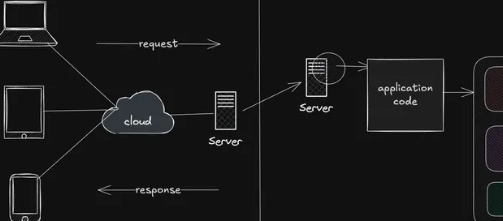
Web Application Architecture: Client-Server, MVC & Layered Architecture
Understand how web applications are structured using client-server architecture, MVC, layered architecture, and related patterns, and learn when each approach is useful.

Web Application Deployment: Vercel, Render, Docker & Cloud
Learn how to take web applications from local development to production using platforms like Vercel and Render, containerization with Docker, and modern cloud deployment platforms.

Version Control with Git & GitHub
Learn how developers track code changes, manage branches, collaborate, resolve conflicts, and maintain projects using Git and GitHub.

JavaScript Package Management: npm, pnpm & Yarn
Understand how JavaScript package managers handle dependencies, scripts, lockfiles, versions, and project environments using npm, pnpm, and Yarn.